
The sensor requests a timestamp from the application server every 10 days by default. The system time can be viewed by logging into the gateway and going to the System --> System Overview menu where you can view the system time.
If you need to update the time on a sensor manually you can do this by running the following command on the device.
To set the time on a device log into Chirpstack and in your QTRACA tenant go to:
Applications --> QTRACA --> Devices
Select your device by clicking on it.
Go to the Queue tab and:
- Click the confirmed tickbox.
- Paste the command 30 + hex timestamp into the textbox.
- Click the Enqueue button
The time will now be set on the sensor after the next sensor upload.
<timestamp> Calculation
User can get the current time from link: https://www.epochconverter.com/
The decimal time must then be converted to hexadecimal: https://codebeautify.org/decimal-hex-converter
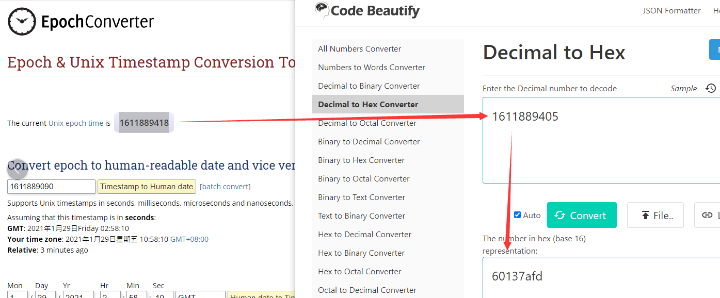
Copy the hex time and place the result into the <hex timestamp> part of the command.
For example: timestamp=1764793987 --> hex 69309e83, command=3069309e83