
QTRACA is a comprehensive inventory and quality assurance cloud based software system. The system is modular and can be run in its entirety, or by modules:
- Inventory
- Quality Assurance
- IoT Monitoring
Not only does QTRACA suit food manufacturers and brand owners, but anyone requiring a comprehensive quality management systems.
Accessing Help
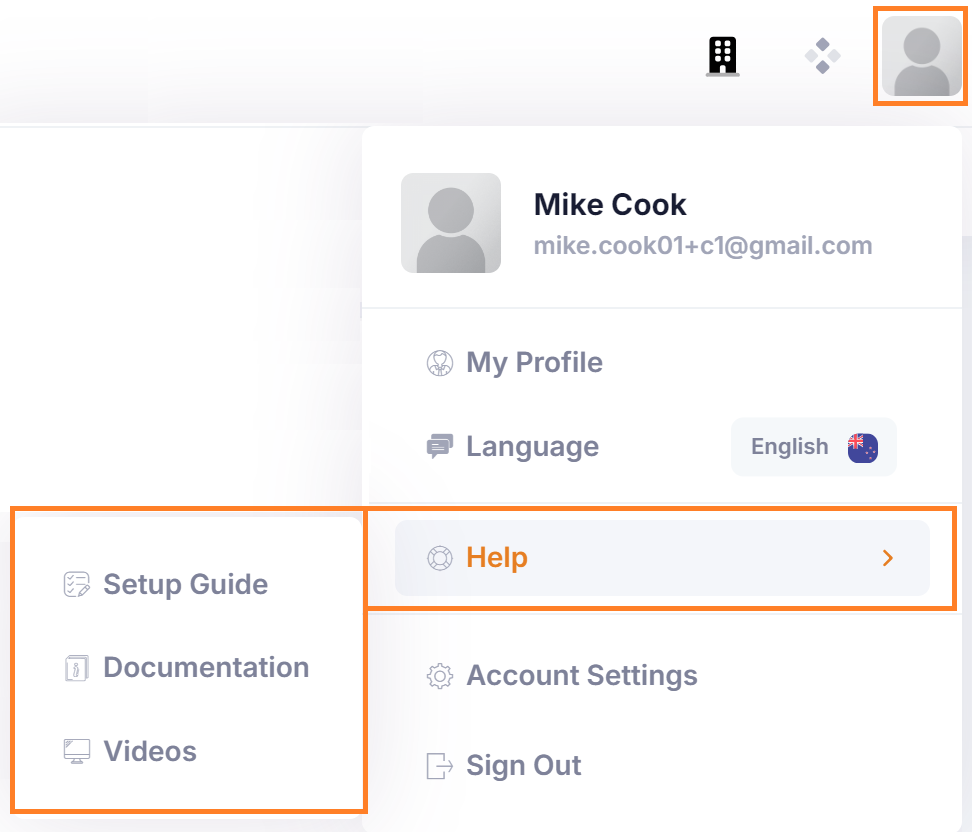 | The easiest way to access support is through your profile menu. Select your profile icon and then navigate to the 'Help' menu. Once there you can access the Setup Guide, Documentation, and Videos. |
Setup Guide
The Setup guide will take you through setting up the system. Follow the order of setup to and once complete your system will be ready for use.
Documentation
You are currently viewing this document in the QTRACA Knowledgebase. Search here to find documentation on any aspect of the system.
Documentation can easily be accessed through the app by going to your profile icon and then selecting Help --> Documentation.
Videos
There are lots of videos which take you through setting up the system. You can access and review videos by going to your profile icon and then selecting Help --> Videos.
My Profile
A user can set there own personal setting through 'My Profile' such as timezone, default site, and default dashboards. If you are the account owning billing can also be accessed here.
Account Settings
There are many settings which can be applied through Account Settings. Features can be turned on or off here, as well as being a place where defaults for the system can be applied.