
| Available in the Xero integration only for 'Sync Sales Invoices for Dispatches' |
If your product codes in Xero do not match those in QTRACA, or you have bundle products in Xero then these can be mapped to QTRACA using the 'Bundle and Product Mapping for Sales Invoices to Dispatches' list.
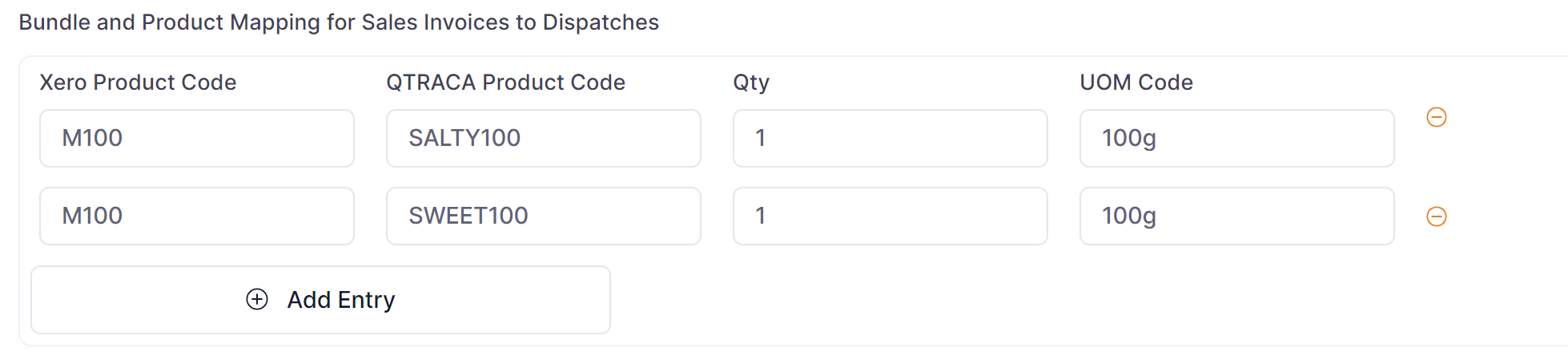
The mapping table contains the following columns:
- Xero Product Code: The product code in Xero
- QTRACA Product Code: The product code in QTRACA
- Qty: The qty that will be dispatched on the QTACA product
- UOM Code: The UOM Code in QTRACA that will be used during dispatch. (Note: unit conversions must be in place if required)
The 'Xero Product Code' column can contain either a single Xero product code, or a comma separated list of Xero product codes. This allows you to map one or more Xero product's to a QTRACA product.
Example 1: Multiple Xero products to One QTRACA product
| Xero Product Code | QTRACA Product Code | Qty | UOM Code |
| X1,X2,X3,X4 | QT1 | 1 | kg |
If 5 units of X1, X2, X3, or X4 are on a sales order in Xero then it will be mapped to 5 kg of QTRACA product QT1.
Example 2: Bundle or Multipack product in Xero
| Xero Product Code | QTRACA Product Code | Qty | UOM Code |
| MULTI1 | QT1 | 2 | 50g |
| MULTI1 | QT2 | 1 | 50g |
| MULTI1 | QT3 | 4 | 50g |
If 2 units of multi pack MULTI1 are on a sales order in Xero, then on the dispatch record in QTRACA the following lines will be created:
- 4 x 50g of QT1
- 2 x 50g of QT2
- 8 x 50g of QT3