
The Stock demand screen can forecast using batches scheduled in the future and calculate the demand on your raw materials.
To access this report go to 'Stock Demand' menu under the 'Inventory' section of the main menu.
Using this report you can gain visibility into your stock and purchase raw materials before you require them.
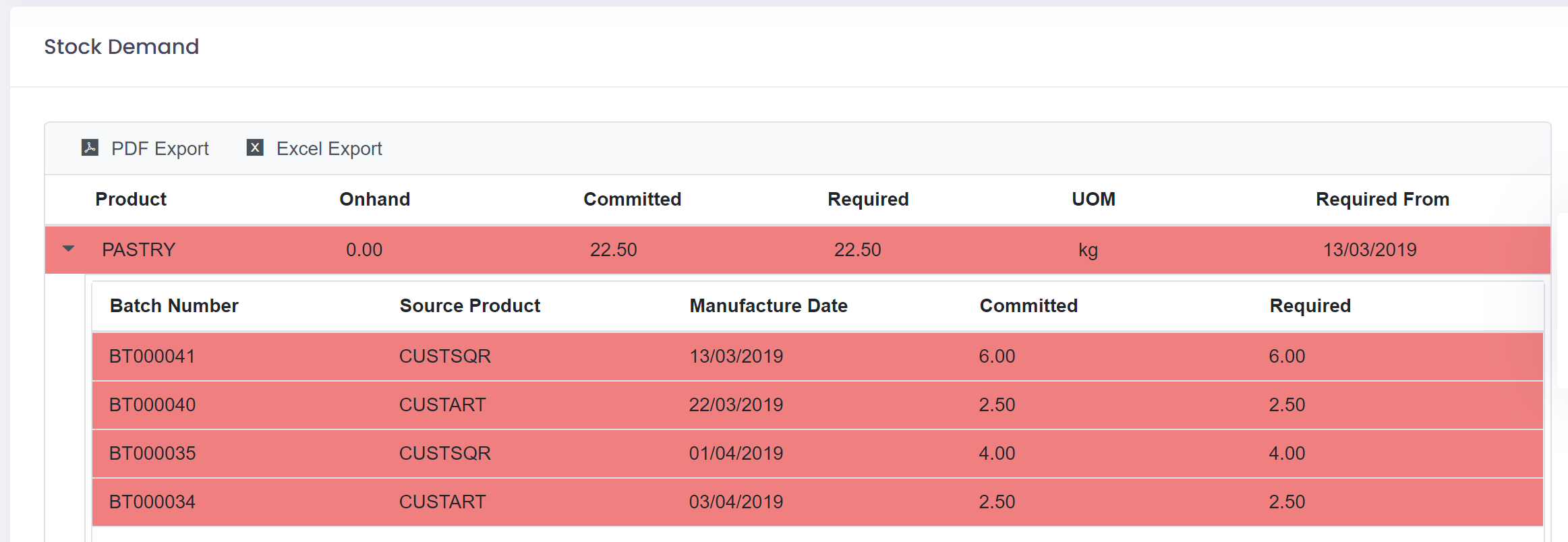
This report will look at your batches scheduled, i.e. not released or on-hold, and calculate the raw materials committed. It will then look at on-hand and calculate when you will require the raw materials and how much you will require by batch.
If a batch uses a WIP product then the on-hand of the WIP product will be checked and if more is required then the demand on those raw materials will also be calculated.
This provides you with a complete picture of your stock levels and requirements into the future.
Note: In order to run this report all your unit conversions must be in place for your raw materials. If a unit conversion is missing you will be notified. Add the requested unit conversion for the raw material and then try running the report again.